Seal Speak puts what the people around you are saying on your iPhone or iPad as they say it, in large clear text. It knows when the voice changes, labels sounds like laughter or a doorbell, and runs entirely on the device, so it works with no internet. $4.99 once: no account, no ads, no subscription.
Version 1.1 is built and in testing. It swaps in a caption engine that made a fifth fewer mistakes than Apple's on 31 hours of accented conversation, adds more caption languages, fills the iPad and the iPhone Duo, and brings Live Translation: on screen, spoken in your ear, or split face to face across a table. A Mac app that captions your calls is in testing too.
I built it first for my mom, who is hard of hearing. 1,088 automated tests, 117 merged pull requests and 31 design decisions on record later, it's on the App Store.
What it does
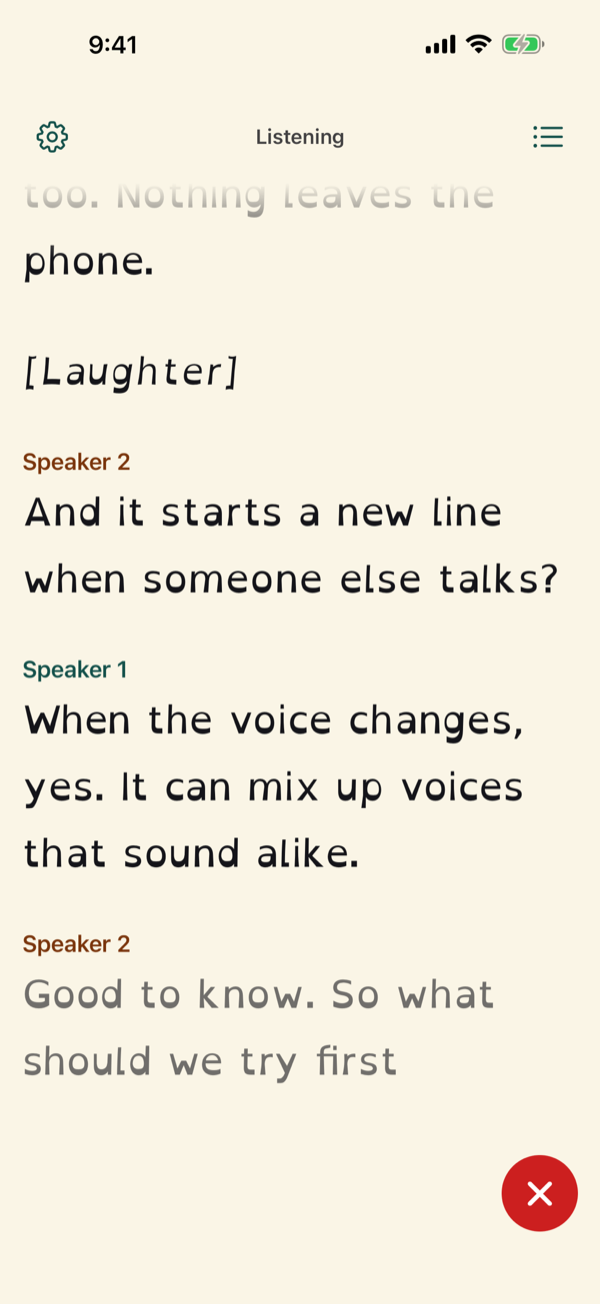
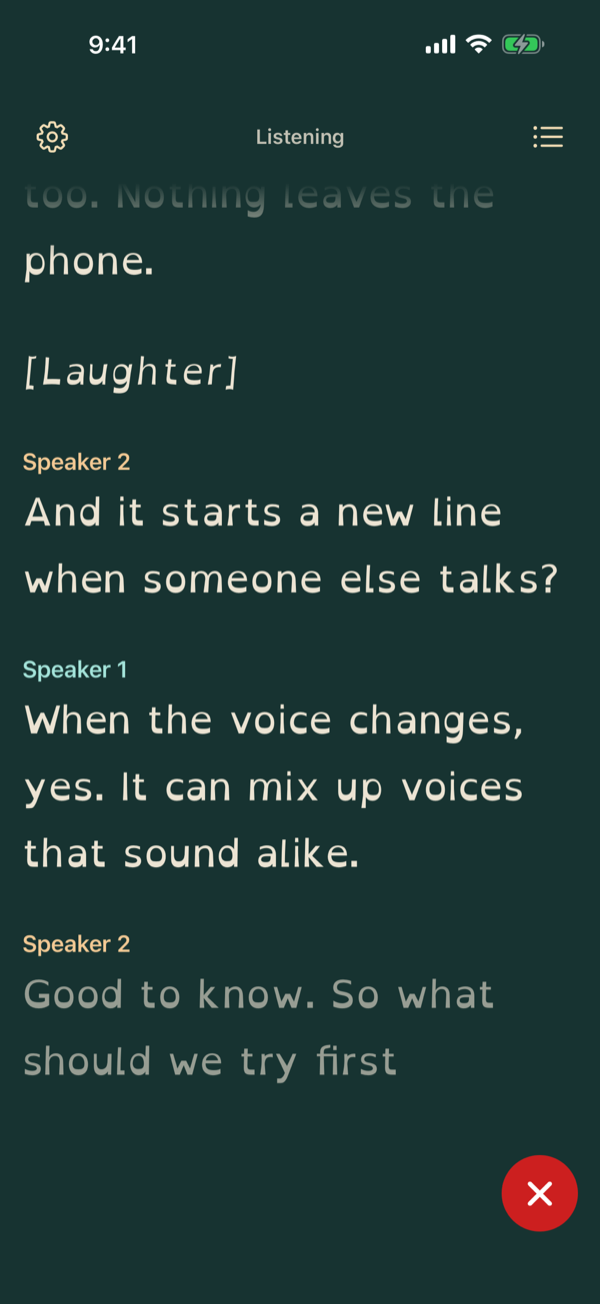
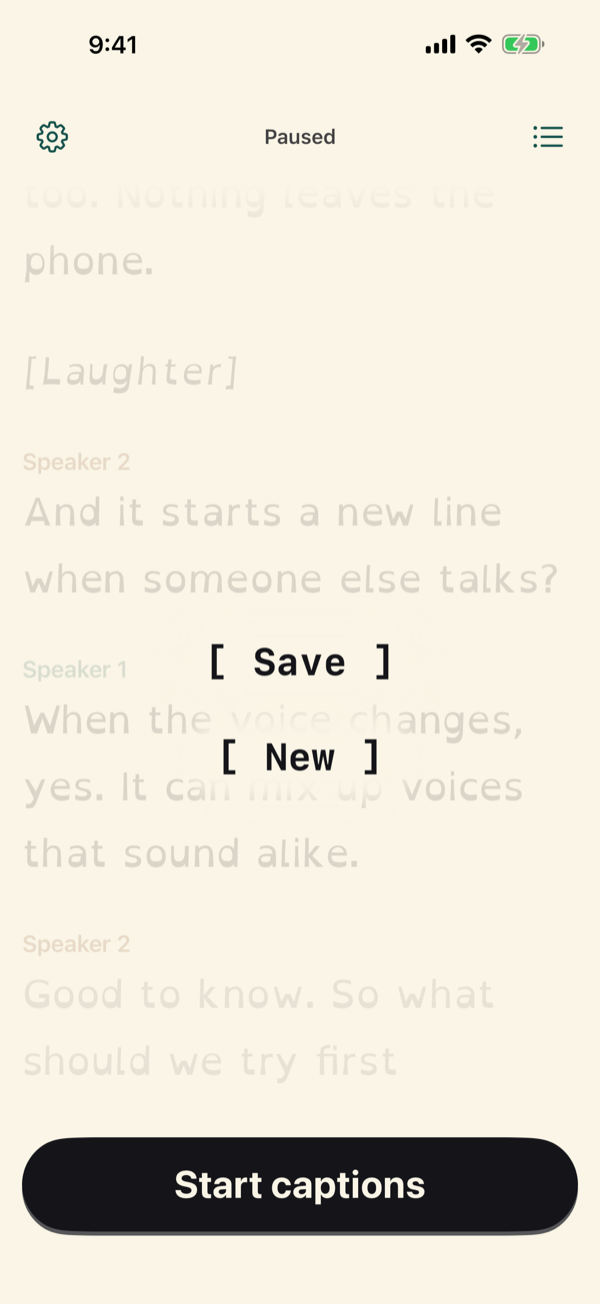
Three features, each with an honest status. The same features, with the same drawings, are on the Seal Speak website; the drawings below are the website's own, running live.
Captions
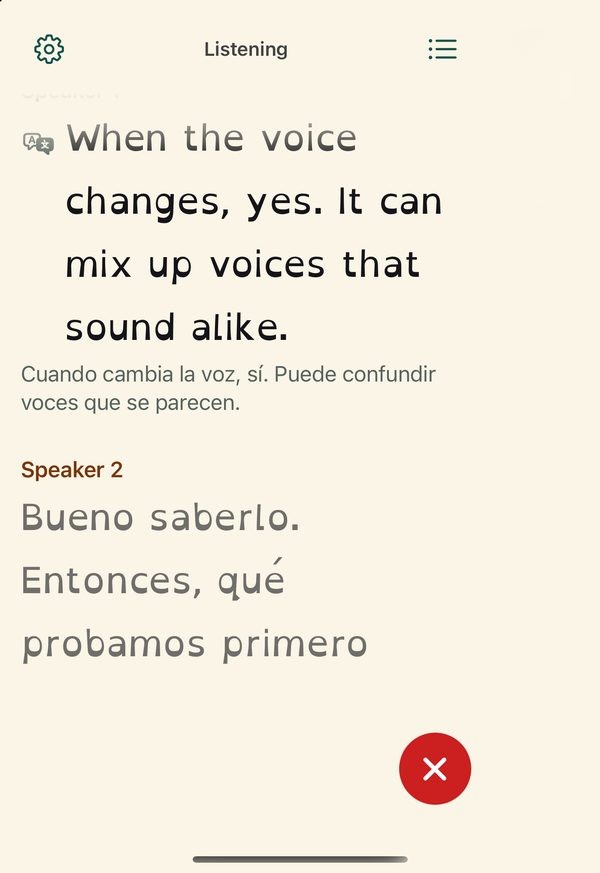
What the people around you are saying, as they say it, in large clear text. Words arrive faint and firm up a moment later, so you're never waiting for a full sentence. A new line, labeled Speaker 1 or Speaker 2, when the voice changes, and short labels for laughter, applause or a doorbell.
It all runs on the device, so it works with no internet. Tap ✕ to pause, then [ Save ] keeps the conversation on the phone for 30 days, left out of iCloud and device backups. Saved conversations sit behind the list icon: search them, share one as text to Notes, Messages or Mail, or delete one or all of them.
- iPhone
- iPad
- iPhone Duo · 1.1
- Mac · in testing
Captions in more languages Coming in 1.1
1.0 captions English. In 1.1 you pick the language the people around you speak. English, Spanish, French, German, Italian and Portuguese run on Parakeet, because it measured better than Apple's engine in every one of them. Japanese, Korean and Chinese stay on Apple's engine, which covers them and Parakeet doesn't. No language is offered until it's been measured.
Full screen on iPad, and the iPhone Duo Coming in 1.1
1.0 runs on iPad in the iPhone-sized layout. 1.1 uses the whole iPad screen, and runs on the iPhone Duo folded or open. These display fixes were planned as 1.0.1 and folded into 1.1.
Live Translation
The captions, translated into your language as people talk, on the device with Apple's translation. Once a language is downloaded, it works with no internet and nothing leaves the device.
On every iPhone it's one-way and for the owner: what the people around you say, in the one language you read, on screen or spoken into your headphones. Two people sharing it across a table needs a bigger screen, so that lives on iPad and an open iPhone Duo.
- iPhone · 1.1
- iPad · 1.1
- iPhone Duo · 1.1
- Mac · coming
An optional add-on, bought once inside the app: $4.99 on iPhone, iPad and iPhone Duo, where it also speaks in your ear and does face to face. $1.99 in the Mac app, where it's translated captions in the room and on calls. Captions stay part of the $4.99 app.
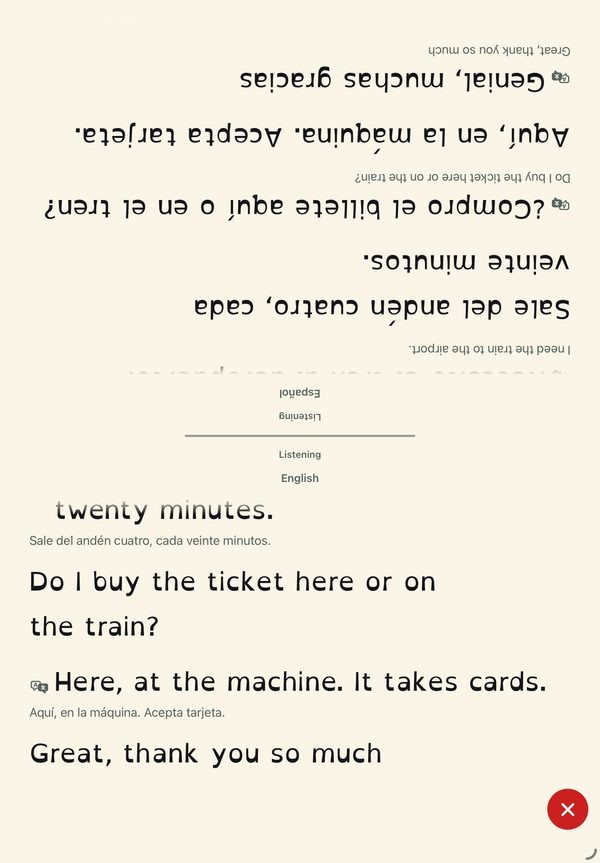
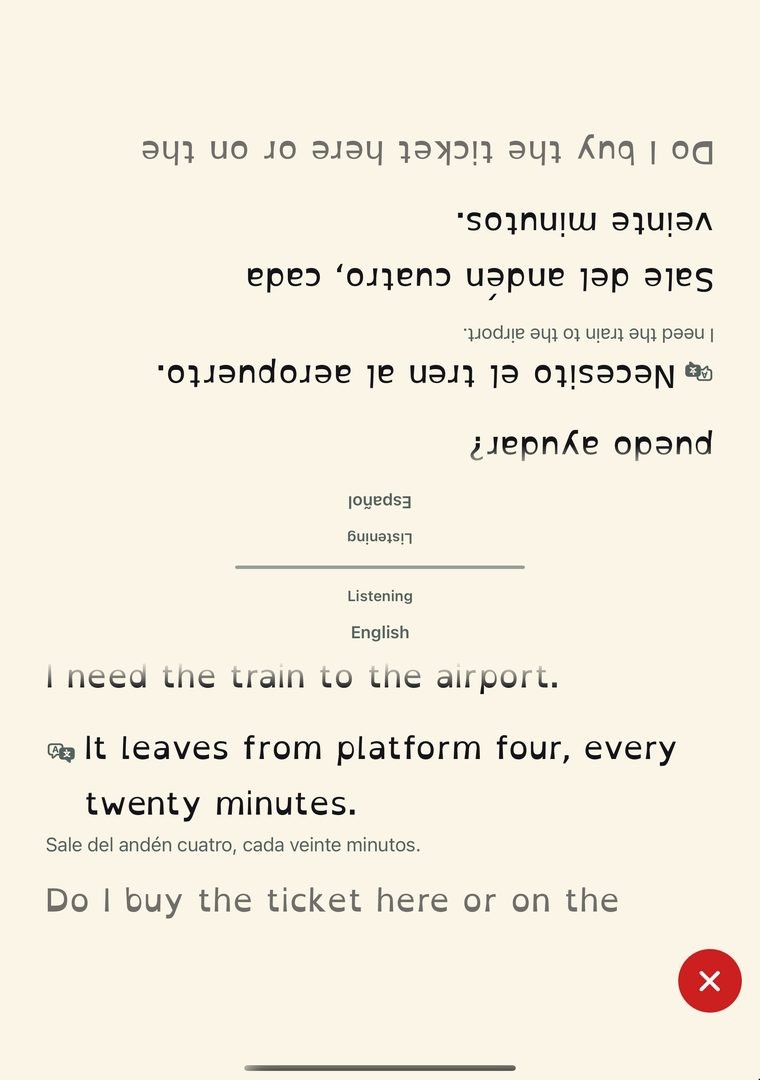
Face to face on an iPad, live. A made-up conversation; the top half is upside down because it faces them.
Two people, two languages, one table. Coming in 1.1
On iPad and an open Duo you also get face to face: lay it flat between you, the screen splits in two, and each of you reads the whole conversation in your own language. You just talk.
- Meeting the grandparents. They speak Portuguese and you don't, yet. Put the iPad on the coffee table and talk.
- A market stall abroad. Ask what's in it and what it costs. You read their answer in English, they read your question in Spanish.
- The new neighbor. Coffee on the porch, the Duo open between you. No more pointing and nodding.
Four times the screen. Face to face lives on iPad and the Duo because each of you needs your own half, big enough to read from across the table. An iPad has about four times an iPhone's screen, so each half is still more than a phone's worth.
Open the Duo, and it's ready for two. Coming in 1.1
Folded, it's an iPhone with translated captions. Open it and stand it up, and face to face is one tap away. Scroll to unfold it.
- Folded: one language, like an iPhone. The other person's words show up translated into yours, with what they said in small type underneath.
- Opening. It opens like a book. The inside screen is big enough for two, so a Face to face button shows up at the top.
- Open: face to face, a language for each half. Tap it and stand the Duo up. Each half picks its language, then the screen splits: your half faces you, theirs is turned to face them, and each shows the whole conversation.
Translation in your ear. Coming in 1.1
Seal Speak speaks the translation into your headphones, any brand, so you can listen instead of read. On iPhone, iPad and iPhone Duo, not the Mac. It's part of Live Translation.

Calls
A separate Mac app that captions your calls and the room around you, with the same engine as the phone. A small window stays on top of the call, and ⌘H hides it.
It captions the sound the Mac plays, so the call app doesn't have to support it. When a FaceTime or iPhone call rings, it offers to caption it, pauses the room's conversation, and brings it back when the call ends.
- iPhone
- iPad
- iPhone Duo
- Mac · in testing
Its own app and its own purchase: $4.99 once, with Live Translation $1.99. It needs Apple silicon and macOS 26, and it isn't on the App Store yet.
A made-up call.
Any call app.
Seal Speak captions the sound your Mac plays, so FaceTime, iPhone calls, Zoom, Teams, Google Meet and WhatsApp all work without doing anything for it.
The room and the call, one conversation.
The Mac's microphone hears the room and the call comes from the app. They join into one stream, so everyone gets their own label, whether they're beside you or on the screen.
A call rings. Seal offers to caption it.
- You're getting a callPause this conversation and caption the call?Caption callNot now
It rings
- Captioning your callHi! Can you read me okay on the computer?Your conversation is paused. It comes back when the call ends.
It captions
- The call endedSave this call's transcript, or go back to your conversation where it left off.Save transcriptReturn
You choose
What's been checked, and what hasn't yet
It takes 1.0 s to switch from the room to a call that rings. So far the call was a stand-in, speech played through the Mac, and words said during that switch can be lost.
- A call's voices, captioned word for word
- The room and the call at the same time
- A call rings, is captioned, then the room comes back
- ⌘H hides the window
- A real FaceTime call ringing
- Zoom, Teams and Google Meet on a real call
- Speakers turned up, for echo
- A full table of people in the room
Which device does what
| iPhone | iPad | iPhone Duo | Mac | |
|---|---|---|---|---|
| Captions | Yes | Yes, in the iPhone layout. Full screen in 1.1 | Folded or open, in 1.1 | In testing |
| Translation | Translated captions, and spoken in your ear, in 1.1 | Translated captions, in your ear, and face to face, in 1.1 | Translated captions, in your ear, and face to face when open, in 1.1 | Translated captions, in the room and on calls, coming |
| Calls | No | No | No | In testing |
| Needs | iPhone 12 or newer, iOS 26 | A14 chip or newer, iPadOS 26 | iOS 26 | Apple silicon (M1 or later), macOS 26 |
One app for iPhone, iPad and iPhone Duo, $4.99 once. The Mac gets its own app, $4.99 once on its own. Live Translation is an add-on: $4.99 on iPhone, iPad and iPhone Duo, where it also speaks in your ear and does face to face, and $1.99 on the Mac, where it's translated captions in the room and on calls.
Planned Android, no date yet. The goal is the same speed and the same experience as on iPhone.
How it works
The built-in microphone feeds an audio tap in roughly 85 ms buffers, and three models read every buffer side by side. Speech to text runs on Apple's on-device SpeechAnalyzer in 1.0. NVIDIA's Sortformer, running through the open-source FluidAudio library on Core ML, works out who is talking. Apple's SoundAnalysis listens for laughter, applause, a doorbell, a phone or a knock, and only shows one above 0.65 confidence.
A smoother joins words to speakers, then the caption stream breaks lines at pauses and speaker changes. Sound labels sit between lines and can never replace speech; that guarantee lives in the data model, not the UI.
Every model ships inside the app, fetched at build time and pinned by a sha256 manifest, with the libraries set to offline mode. There's no hidden code path to a server.
The next engine
Version 1.1, built and in testing but not on the store yet, moves speech to text to Parakeet Ultra, with its encoder compressed to 6 bits so the whole model fits in 498 MB. Parakeet is an offline model, so I wrote a streaming decoder for it: re-read the last stretch of audio every half second and commit only the words two reads in a row agree on. Apple's engine stays in the app as an automatic fallback on a memory warning, low memory or a hot phone.
Translation, face to face and the ear
Translation runs on Apple's on-device translator, which won a three-way test (below), in about 50 to 70 ms a line. Face to face only appears when the screen's short side is at least 600 points. An iPad mini (744) and an open Duo (669) clear it; every plain iPhone (440 at most) and the folded Duo (466) don't. The app measures the screen instead of guessing from the device name.
In the split, each half picks its language, and each voice is matched to a half by the language its words are in. A half shows its own speaker's words as said, and the other person's translated, with what they said in small type under it.
The ear doesn't wait for whole sentences. In a spike, on 54 of 87 test lines, the first three words were final a median of 2.0 seconds before the whole line. So once those words have held still on screen for 0.8 seconds they're translated and spoken, and the rest follows when the engine finishes. On the Mac and the iPhone simulator, a finished line reaches your ear about a second after the person stops talking, before Bluetooth adds its own delay. When people talk faster than the voice, it speeds up a tenth for each phrase waiting, never past 1.3 times, and never skips. It plays only into headphones, never the phone's speaker, and an echo guard keeps the app from captioning its own voice.
Calls on the Mac
The Mac app hears a call through a Core Audio process tap: audio only, under the narrower system-audio permission rather than full screen recording. By default it taps every sound the Mac plays except its own, which covers FaceTime, Continuity calls and every other call app with no guessing which process plays the far side. The tap feeds the same caption pipeline as the phone, behind the same audio seam the microphone uses.
The hard calls
I cut my own headline feature
The first design filtered the owner's own voice out of the captions. An independent review killed it on day one. Real-time voice matching lags by seconds, and the two kinds of error aren't equal: showing her own words is a small annoyance, but hiding someone else's sentence by mistake is a loss she can never detect. It also needed voice training, which broke the works-for-anyone rule. So Seal shows everyone and labels the turns instead. A wrong label is visible, and she can recover from it.
Dim, don't dismiss
The same reasoning set a rule for everything after it: the app never silently drops speech. Words it's still working out show up faint right away instead of waiting, and nothing it hears is filtered out of view.
One voice, two speakers
On my own phone, talking alone, I got labeled Speaker 1, then Speaker 2, sometimes Speaker 3. I built a replay test that pushes synthetic voices through the real diarizer at the app's buffer size and scores every word's label. The cause turned out to be the model itself reassigning a voice after a change in pitch or pace. A smoother cut live relabels from 8.1 to 4.5 a minute on the worst voice without slowing real turn-taking. Two other fixes I tried made things worse by merging the next person's first words into the previous line, so I threw them out. The full fix needs a voice re-identification model, and the app says so honestly: "It can mix up voices that sound alike."
My benchmark lied to me
The latency test reported 0.000 seconds of lag on every run. It was measuring how far the recognizer's audio position trailed the feed, which is near zero by design, instead of wall-clock time. I rebuilt it around real elapsed time. A number that's too good is a bug until proven otherwise.
Who sits on which half
Face to face has to put each voice on the right half, and bilingual people switch languages mid-sentence. The first rule moved a voice to the other half after two lines in a row in the other language. I tested it on 56 recorded conversations between Spanish-English bilinguals, about 25 hours and 45,576 lines from the Bangor Miami corpus: it put 9.35% of lines on the wrong half and moved people 397 times when it shouldn't have.
I replaced it with a confidence for each voice. A sure line of four or more words in its language adds a point, up to 12. A sure line in the other language takes one away. Mixed lines count for nothing, so Spanglish moves no one. The voice moves at minus two. Wrong-half lines fell to 3.03% and wrong moves to 27, and a voice that really changes is still followed in about 40 seconds. I picked the scoring rule before comparing 27 sets of numbers, so the winner couldn't be chosen after the fact. These runs used the corpus's own transcripts, not live engines, and someone who speaks both languages equally still has no right half to find.
Speaking before the sentence is done
Waiting for a finished line makes the voice in your ear trail the speaker by seconds. Speaking early risks a word the engine later changes, and a spoken word can't be taken back. So only the first phrase of a line goes early, only once it has held still, and the rest waits for the engine. When the voice falls behind, it speeds up instead of skipping, because a skipped phrase is a loss the listener never sees.
One-way on the iPhone
Two people can't both read a 6-inch screen across a table, so on a plain iPhone translation is for the owner alone: their language, on screen or in their ear. The two-person split appears only where each half is still bigger than a phone. That cut a feature from the phone, and it kept the phone's screen readable.
Fewer features, on purpose
I cut naming speakers, a custom vocabulary list and an Apple Watch app, and held the Mac app out of 1.0. Each one added a screen or a promise I couldn't keep yet. The 1.0 look is frozen to a tagged baseline; any visual change now needs my sign-off with screenshots against it.
Where it stands
Version 1.0 runs on iPhone 12 or newer with iOS 26, and on iPad in the iPhone layout. It has no account, no ads, no subscription and no tracking, and its App Store privacy label says no data is collected.
Every version, and where it stands:
Released on the App Store Coming in 1.1 built, in the next version In testing built, no release yet Planned decided, not built yet
- Released1.0, on the App Store since 28 October 2026. Live English captions on iPhone (and on iPad in the iPhone layout), a new line when the voice changes, sound labels, six themes and six letterings, Save for 30 days with search and share, no internet needed. Captions come from Apple's on-device speech recognition.
- Coming in 1.11.1.0, built and not yet submitted to Apple. Parakeet makes the captions in English, Spanish, French, German, Italian and Portuguese, with more languages on Apple's engine. The iPad and iPhone Duo use the whole screen (the planned 1.0.1 fix became part of 1.1). Live Translation arrives as a $4.99 add-on: on screen on every iPhone, spoken in your ear, and face to face on iPad and an open Duo. It goes to Apple once it passes checks on a real iPhone and iPad, including caption lag with translation on and off, memory with the speaker model, an hour of heat and battery, and accuracy in a real room.
- In testingThe Mac app, which captions your calls and the room together. Test builds run on my Macs; it will be its own $4.99 app, with Live Translation $1.99, and it isn't on the App Store yet.
- Planned1.2, the optimisation release: a smaller caption engine with no more mistakes, so the download shrinks, and more caption languages, each one measured before it's offered.
- PlannedAndroid, with the same speed and the same experience as on iPhone. No date yet.
What isn't proven yet: every accuracy and speed number on this page was measured on a Mac. The phone checks gate 1.1, and the speaker labels still mix up voices that sound alike.
The science behind it
I don't pick parts by reputation. Every engine choice in Seal comes from a test on the same real recordings, scored the same way, with confidence intervals. When two ranges overlap, I don't call a winner.
Which engine follows accents best
A dinner table isn't a recording studio, and the people at it don't all sound alike. So I ran four on-device engines over all of EdAcc, the Edinburgh International Accents of English Corpus: 31.4 hours of real two-person conversation from 122 speakers across 32 accent groups, with human-checked transcripts. The test ran unattended on my Mac mini, shard by shard.
Show the numbers
| Engine | WER | 95% CI | Correct word, median |
|---|---|---|---|
| Parakeet Ultra, 6-bit (Seal 1.1) | 13.8% | 12.8–14.8% | 0.25 s |
| Parakeet v2 | 15.5% | 14.5–16.6% | 0.24 s |
| sherpa-onnx | 16.1% | 14.9–17.2% | 0.39 s |
| Apple SpeechAnalyzer (Seal 1.0) | 17.2% | 16.0–18.4% | 0.67 s |
Parakeet Ultra made about a fifth fewer mistakes than Apple's engine (13.8% against 17.2%), and the confidence intervals don't touch. It had the lowest error rate in every named accent group with three or more speakers, with the biggest gains on Nigerian, Kenyan, Spanish and Vietnamese English. Compressing its encoder to 6 bits cost nothing measurable; 4 bits cost a point.
Show the numbers
| Accent group | Speakers | Apple | Parakeet |
|---|---|---|---|
| Vietnamese | 10 | 26.2% | 21.5% |
| Jamaican English | 6 | 22.5% | 18.1% |
| Nigerian English | 5 | 22.0% | 17.2% |
| Chinese | 4 | 20.5% | 17.0% |
| Spanish | 6 | 19.1% | 15.7% |
| Southern British English | 11 | 17.1% | 13.9% |
| Irish English | 7 | 16.6% | 13.1% |
| European | 3 | 16.5% | 13.6% |
| Bulgarian | 3 | 16.3% | 12.5% |
| Eastern European | 3 | 15.7% | 12.6% |
| Mainstream US English | 17 | 15.3% | 12.6% |
| Indian English | 5 | 13.9% | 11.4% |
| Latin American | 3 | 12.5% | 10.4% |
| French | 3 | 12.3% | 9.9% |
| Italian | 7 | 12.0% | 9.8% |
| Scottish English | 4 | 10.7% | 9.4% |
And it's faster
Being right matters less if the word shows up after the person has moved on. Fed in as if live, a word showed correctly in a median 0.25 seconds on Parakeet against 0.67 on Apple's engine.
Seal 1.0
Seal 1.1
Other languages, measured before offered
On read speech from FLEURS, Parakeet made 30 to 40% fewer mistakes than Apple in Spanish (2.8% against 4.0%), French (4.5% against 7.5%) and German (4.4% against 7.2%), again with no overlap. Italian (2.2% against 3.6%) and Portuguese (3.9% against 5.3%) followed the same pattern. For translation, I scored three on-device translators on the same 1,012 FLORES-200 sentences, then again written the way captions arrive (lower case, no punctuation). Apple's translator came out ahead in all three languages and lost the least without punctuation.
Show the translation scores (chrF, 0 to 100, higher is better)
| English into | Apple | OPUS-MT | Google ML Kit |
|---|---|---|---|
| Spanish, written | 56.8 | 55.0 | 53.2 |
| Spanish, as captions | 54.8 | 51.2 | 51.8 |
| French, written | 73.2 | 69.8 | 65.4 |
| French, as captions | 69.7 | 63.0 | 62.6 |
| German, written | 68.2 | 63.6 | 59.0 |
| German, as captions | 65.9 | 58.2 | 56.7 |
Then I ran the winner in all 19 languages it offered, on the same 1,012 sentences, scored with COMET, which judges whether the meaning came across and compares fairly between languages. 18 of the 19 landed in the same range as Spanish, French and German, at 70 ms or less a line. Hindi scored lowest and needs a closer look before it's offered.
- Indonesian0.920
- Japanese0.912
- Turkish0.903
- Portuguese0.899
- Korean0.899
- Ukrainian0.898
- Vietnamese0.892
- Polish0.889
- Russian0.886
- German0.883
- French0.879
- Italian0.879
- Dutch0.879
- Thai0.879
- Chinese (Trad.)0.875
- Chinese (Simpl.)0.871
- Arabic0.870
- Spanish0.863
- Hindi0.807
How the scoring works. Word error rate is (substitutions + deletions + insertions) ÷ words said, pooled over clips. Each 95% interval comes from a speaker-level bootstrap with 1,000 resamples, so one talkative speaker can't swing the result. Every engine sees exactly the same clips. Only aggregate scores are published; the corpus audio never leaves my machine.
The design research
- Low-vision readers read better with brightness contrast than with colour contrast, so themes are built on brightness and tested to 7:1.Legge et al. (1990), Psychophysics of reading XI, JOSA A.
- Dark text on light read slightly better, with a smaller gap for older adults, and dark mode caused no extra eye strain. Both work, so Seal offers three of each.Piepenbrock et al. (2013), Ergonomics. Participants had healthy eyes.
- No controlled study shows harsh yellow-on-black is easier for older eyes, so the dark themes are calm instead: no pure black, warm off-white text.Searched October 2026; guideline-level evidence only.
- Caption readability for older viewers depends on size, font, spacing and contrast, the four things Seal lets you change.Caption readability study with older TV viewers, Sun Repository.
- OpenDyslexic is the default lettering, offered for comfort. Studies haven't shown it speeds up reading, so Seal never claims it does.Wery & Diliberto (2017), Annals of Dyslexia.
- Even in a silent room, the Listening light keeps the 3:1 contrast WCAG asks of a status indicator.WCAG 2.1, non-text contrast.
- Built on open models with licences that allow a paid app: FluidAudio (Apache-2.0), Sortformer and Parakeet (CC BY 4.0, credited in the app). EdAcc is CC BY-SA, FLEURS CC BY 4.0.Licences checked before any test; non-commercial models are ruled out.
Where it's going
The engineering direction is decided, and every step of it gets measured the same way as the engine choice above.
The best engine for every scenario Planned
Quality is the product, and the measurements already split by language: Parakeet beats Apple in English and five European languages, an open Hebrew model makes about a third of Apple's mistakes, and Apple's translator beat both open alternatives. So the next step is one scoreboard, language by engine by device by task (captions, translation, the voice in your ear), generated from the test results. The app's routing reads it: the best engine, then the smallest build whose confidence interval overlaps the best one's. Every size cut and cleanup shows its before-and-after quality there, and none may cost quality.
Smaller, with no more mistakes Planned
A model is mostly numbers, and storing each one in fewer bits shrinks the download. The question is how few it takes before the captions get worse, and the north star is 2 bits. I tried it first on a small Hebrew model:
| Hebrew model | Size | Wrong letters per 100 |
|---|---|---|
| Full size (32-bit) | 267.1 MB | 2.4 |
| 4-bit | 38.6 MB | 2.4 |
| 3-bit | 30.4 MB | 2.6 |
| 2-bit | 22.3 MB | 34.7 |
At 4 bits it made no more mistakes than at full size, at a seventh of the size. 3-bit barely slipped and 2-bit fell apart. English 3-bit and 2-bit Parakeet builds are next, on the same 31.4 hours of EdAcc. One surprise: fewer bits weren't faster on my Mac, so speed has to come from somewhere other than compression. Scored on recorded Hebrew conversations (ivrit.ai eval-d1), on a Mac.
Languages as downloads Planned
The 1.1 build is 765 MB, and every user pays for both big models, 498 MB of Parakeet and 241 MB of speaker model, whatever language they speak. The design I've written makes the base install the app with Apple's engine, about 26 MB, captioning from the first launch. Each language's best engine then comes down as a pack when you need it, including Seal's own models for languages Apple handles badly or not at all.
Android Planned
A feature's first version may use Apple's frameworks, but each one gets a measured comparison against an engine that also runs on Android, so the Android app can pick its own winners. The goal is the same speed and the same experience as on iPhone, and as close to the same look as Android allows.
Built with MARVIN
I built Seal Speak with MARVIN, the AI development system I run across my machines. 19 of the 117 merged pull requests came straight from its autonomous ticket pipeline, from a ticket to a reviewed, merged change.